

Description
Download Zoho Show – Online Presentation Tool, PowerPoint Alternative
Overview
Zoho Show is a cloud-based presentation tool designed to help users create, share, and deliver professional-quality presentations from any device with a web browser. It serves as a robust alternative to traditional desktop-based presentation software, particularly appealing to professionals, educators, students, and business users who need to collaborate remotely. The software enables real-time co-editing and remote presentations, making it ideal for distributed teams, online classrooms, and virtual client meetings. With built-in themes, drag-and-drop functionality, and a library of clipart and shapes, Zoho Show simplifies the creation process, even for users without advanced design skills. Its integration with web platforms allows presentations to be embedded directly into blogs or websites, enhancing content delivery for digital creators. The developer, Zoho Corporation, is known for its suite of productivity tools, which supports the reliability and scalability of the platform. While the software is primarily web-based, it supports offline access through its Chrome App integration, offering flexibility for users in low-connectivity environments.
Key Features & Capabilities
- Import/Export Compatibility: Zoho Show supports importing and exporting Microsoft PowerPoint (.ppt, .pps) and OpenDocument (.odp) formats, ensuring seamless transition from other presentation tools. PDF and HTML export options are also available, allowing for secure sharing and offline viewing.
- Real-Time Collaboration: Users can share presentations with colleagues or friends, enabling simultaneous viewing and editing through a browser. This feature is especially useful for remote teams or group projects where input from multiple contributors is required.
- Remote Presentation Mode: Presenters can deliver live presentations to clients or audiences located anywhere in the world, using just a browser. This eliminates the need for travel or specialized presentation software.
- Embeddable Slideshows: Presentations can be published publicly and embedded into websites or blogs, making them accessible to readers without requiring them to download or install any software.
- Visual Design Tools: The platform includes a wide range of shapes, symbols, and flowchart templates. Users can draw diagrams and organize complex information visually using a drag-and-drop interface.
- Transitions and Animations: Over 30 transition styles—such as Cover, Wipe, Split, and Fade—are available to enhance slide flow. Text elements can be animated individually for dynamic storytelling.
- Grids and Guides: Precision alignment is supported through grids and guides, with 'Snap To' options that help align objects accurately for a polished look.
- Image Integration: Publicly shared images from Picasa and Flickr can be imported directly into presentations, enriching content with real-time visual assets.
- Zoom Functionality: Users can zoom in and out of the slide editor for detailed adjustments, improving control during design and layout.
User Interface, Workflow & Performance
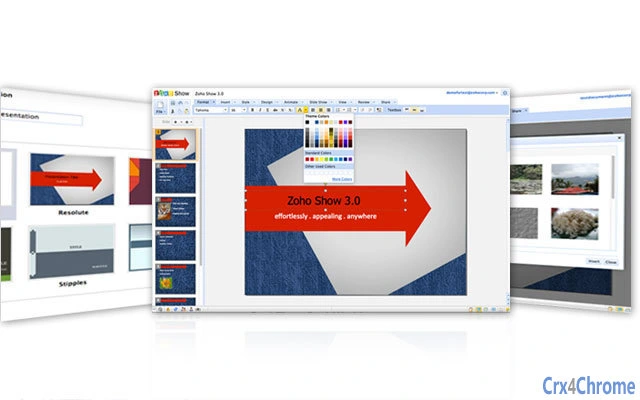
The user interface of Zoho Show is clean and intuitive, designed for ease of navigation across different devices. The main workspace is divided into a slide editor, a sidebar for slide management, and a toolbar with formatting and design options. The drag-and-drop interface streamlines the process of adding elements, arranging content, and applying transitions. Workflow efficiency is enhanced by the cloud-native architecture, which allows users to access their projects from any location without the need to transfer files. The software operates primarily in a browser environment, meaning performance is dependent on internet speed and browser capabilities. The developer did not specify resource usage details, so actual CPU and RAM behavior during operation remains unspecified. However, as a web-based application, it generally consumes fewer local resources than desktop alternatives. Stability is maintained through regular updates and cloud-based infrastructure, minimizing crashes. Offline functionality is available via Chrome App integration, allowing limited editing when connectivity is lost. General performance observations are based on typical behavior of browser-based tools, with responsiveness varying depending on network conditions.
Compatibility & System Requirements
Zoho Show is compatible with Windows, Mac, and Linux operating systems, making it accessible across major desktop platforms. The software operates primarily through a web browser, eliminating the need for a native installation on most systems. However, a Chrome App version is available for enhanced functionality and offline access. The installation size is listed as 120MB, which refers to the Chrome App package. The developer did not provide additional system requirements, such as minimum RAM or processor specifications. Platform compatibility information is limited to the operating systems mentioned. Users should ensure their browsers are up to date for optimal performance. For those relying on offline use, the Chrome App must be installed separately. The software does not require a dedicated hardware configuration, as processing is handled primarily in the cloud.
Pros and Cons
Pros
- Free to use with no cost barrier for individuals and teams
- Real-time collaboration features enable seamless remote teamwork
- Supports import/export of common presentation formats including PowerPoint and PDF
- Embeddable presentations can be shared directly on websites and blogs
- Rich design tools with shapes, flowcharts, and animation options
- Accessible from any device with a browser and internet connection
- Offers offline access via Chrome App for uninterrupted workflow
Cons
- Relies heavily on internet connectivity for full functionality
- Advanced features may require a stable and fast connection
- Chrome App dependency limits full functionality on non-Chrome browsers
- No native mobile application available (as of current information)
- Performance may vary based on browser and network speed
FAQ Section
Is Zoho Show available for Windows, Mac, and Linux?
Yes, Zoho Show is compatible with Windows, Mac, and Linux operating systems. It runs through a web browser and is accessible from any device with an internet connection.
Can I use Zoho Show without an internet connection?
While the full feature set requires an internet connection, offline access is available through the Chrome App. This allows limited editing when connectivity is unavailable.
Is Zoho Show safe to use?
As a cloud-based tool developed by Zoho Corporation, Zoho Show follows industry-standard security practices. User data is encrypted in transit and stored securely. However, users should always follow best practices for account protection.
How often does Zoho Show receive updates?
Updates are released regularly by Zoho Corporation to improve performance, add new features, and address security concerns. Users are encouraged to keep their browser and Chrome App up to date.
Can I use Zoho Show as a PowerPoint alternative?
Yes, Zoho Show supports importing and exporting Microsoft PowerPoint files (.ppt, .pps), making it a viable alternative for users seeking a cloud-based, collaborative presentation tool.
Final Thoughts + CTA
Zoho Show delivers a compelling, free solution for creating and sharing dynamic presentations across remote teams, educational institutions, and businesses. Its browser-based nature ensures accessibility, while real-time collaboration and embeddable slideshows extend its utility beyond traditional meetings. With strong compatibility, intuitive design, and a rich set of features, it stands out as a modern alternative to desktop-based tools. While internet dependency and limited mobile support are considerations, the benefits of cloud integration and cross-platform access outweigh these limitations for most users. For professionals, educators, and students seeking a powerful, free presentation tool, Zoho Show is an excellent choice. Download Zoho Show now and elevate your next presentation.
Guides & Tutorials for Zoho Show App for Chrome
How to install Zoho Show App for Chrome
- Click the Preview / Download button above.
- Once redirected, accept the terms and click Install.
- Wait for the Zoho Show App for Chrome download to finish on your device.
How to use Zoho Show App for Chrome
This software is primarily used for its core features described above. Open the app after installation to explore its capabilities.
User Reviews for Zoho Show App for Chrome 0
No reviews found





